



How Fairphone Moments works with /e/OS on the Fairphone (Gen.6)
In various forums and social media channels, we often come across the same valid question:
Does Fairphone Moments – the switch for your Fairphone (Gen.6)’s customizable minimalist mode – work with Murena’s /e/OS?
The answer is a clear YES.
Yes, the Fairphone Moments switch works fully with /e/OS on the Fairphone (Gen. 6) and can be customized in the same way as on a device running Google Android.
Let us break down the topic in more detail in this article:
- What is Fairphone Moments?
- Does Fairphone Moments work with Murena’s /e/OS?
- How does Fairphone Moments work with Murena’s /e/OS?
- Discover the Fairphone (Gen.6) with /e/OS
What is Fairphone Moments?
Today, we’re used to being constantly connected to the outside world. Notifications on our smartwatches, a repetitive vibration in the corner of an office – even in a doctor’s waiting room, the ringing of a cell phone is now taken for granted.
Yet, research has confirmed that a single notification – whether it’s from your own phone or from someone else’s – causes immediate cognitive disruption that impairs attention and task performance, comparable to actively using a phone, even WITHOUT checking the device. [*]
A good reason to stay disconnected from time to time, right?
The Fairphone team doubted that their customers wanted to live their lives in flight mode. That’s why they developed the Moments switch: a customizable side button on the Fairphone (Gen. 6), easily reachable, to switch to a minimalist smartphone experience: the Fairphone 6 focus mode.
Does Fairphone Moments work with Murena’s /e/OS?
Yes, the Fairphone Moments switch works fully with /e/OS and can be customized in the same way as on a device running Google Android.
On Murena’s version of the Fairphone (Gen. 6) with /e/OS, the switch used to be a software kill switch that instantly disabled the microphone and cameras. Now, it can be configured to suit your needs – whether that’s activating minimalist mode, privacy mode, or another function of your choice.
This highlights once again that ethical hardware and ethical software go hand in hand: while /e/OS protects your privacy from trackers, Fairphone’s sustainable hardware gives you even more peace of mind and takes your focus to another level with the Fairphone 6 focus mode.
How does Fairphone Moments work with Murena’s /e/OS?
By default, the side switch on the Fairphone (Gen.6) with Murena’s /e/OS works like a software kill-switch that disables all cameras and the microphone. To customize it on your device running /e/OS, simply go to Settings > System > Buttons and find Physical Switch. Just underneath, you can choose the switch action.
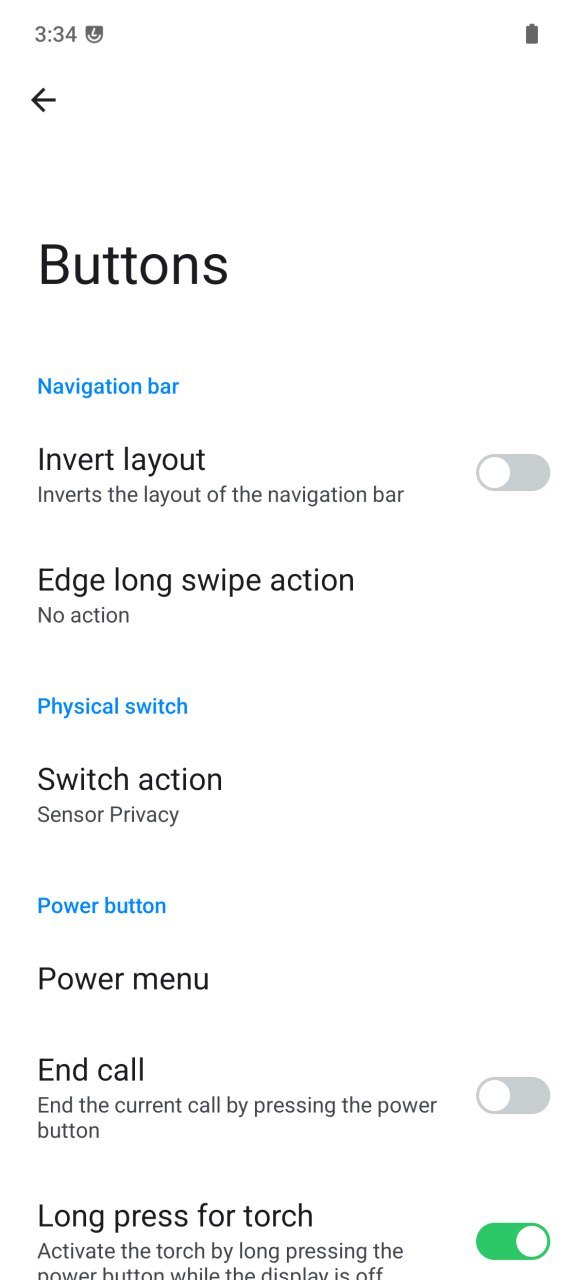
What are the options for the switch on your Fairphone (Gen.6) with /e/OS?
In the Switch Action Menu, you have the choice between different modes:
| Option | Description | Best For |
| Sensor Privacy | Turns on/off camera and microphone | Privacy-conscious users |
| Fairphone Moments | Customizable actions | Full flexibility |
| Do Not Disturb | Suppresses all notifications | Deep focus sessions |
| Flight Mode | Disables all connections | Travel or peaceful sleep |
| Torch Light | Activates the flashlight | Adventures and emergencies |
| Dark & Light Mode | Toggles display theme | Light-sensitive users |
| Battery Saver | Enables power-saving mode | Long journeys without charging |
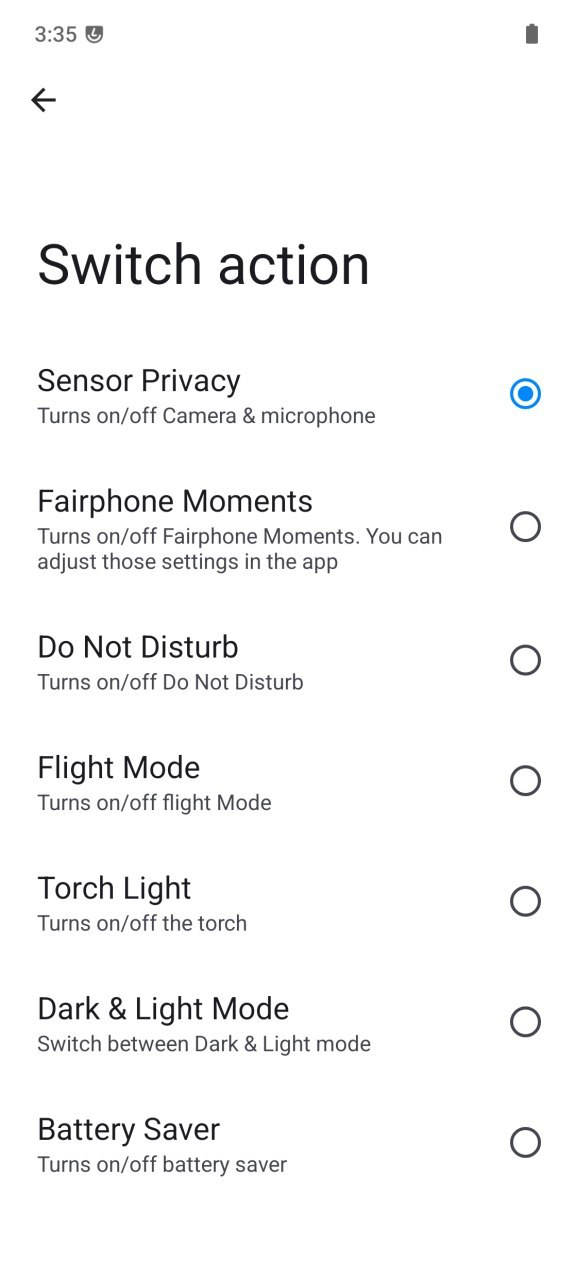
Once your preferred mode is enabled, it activates as soon as you toggle the side switch on your device.
Now that we’ve cleared up the one remaining question keeping you from choosing /e/OS over Google Android:
Discover the Fairphone (Gen.6) with Murena’s /e/OS on our website
Or, for readers in the United States:
Head to our US store
How will you customize your side button? Do you prefer a kill-switch or a minimalist mode? Let us know in the comments!
Does Fairphone Moments work with /e/OS?
Yes, Fairphone Moments works perfectly with /e/OS – either as a one-click kill switch for camera and microphone, or as a customizable tool for a minimalist smartphone experience.
Any other question?
Feel free to leave it in the comments.
*https://carystothart.com/publications/attentional-cost-cell-phone-notification


4 Comments
Please, add an option “send public intent”, so we can build our app upon this special thing, it would be lovely
Moments was one of the first places I went after Maps. It actually gives you the illusion of a peace filled place and this is certainly needed for us in this crazy world.
Suggestion: don’t compare it to Google, I’m one of the two people never to have used it so we have no idea at all, its just a new, lovely place to go hide😊
How to customize since we can’t have the fairphone app on eos?
Hello, thanks for pointing this out!
You can simply access Settings > System > Buttons and find Physical Switch and will be able to customize Fairphone Moments there.
The app settings are integrated to the system, so we are considering to update the slighly misleading text you see in the image. No need to download the app.